ROS 2 Yasmin State Machine
Yasmin (Yet Another State MachINe) is a lightweight, Python finite state machine framework for ROS 2. It mirrors the SMACH pattern with State, StateMachine, and Blackboard classes, plus optional ROS logging hooks and a simple viewer. This entry outlines what Yasmin provides, how to install it, and how to use it to organize ROS 2 control logic. It also documents how we apply Yasmin to SNAAK, tying together manipulation actions, perception services, and stock tracking, and closes with a short comparison against behavior trees for similar tasks.
Core Fundamentals of YASMIN
YASMIN uses finite state machines to describe robot behavior: the robot is always in one well-defined state, that state does some work, then reports an outcome that selects the next state. This gives a clear, deterministic graph of behaviors and makes it easy to reason about and debug complex tasks.
Finite State Machines (FSM)
An FSM has a finite set of states and transitions between them. In robotics, each state corresponds to a concrete mode or action (for example, “Idle”, “Navigate”, “Grasp”), and transitions capture how the robot switches modes as inputs or sensor data change. YASMIN’s StateMachine class implements this pattern and handles running the active state, collecting its outcome, and jumping to the next state.
Hierarchical Finite State Machines (HFSM)
When the number of states grows, a flat FSM can become hard to manage. YASMIN addresses this with hierarchical FSMs, where a “state” can itself be another state machine. This lets you hide complex sub-behaviors (such as navigation or manipulation) behind a single high-level state and keep top-level graphs small and readable, while still reusing those sub-machines in other tasks.
Key Components in YASMIN
State
A state is the basic building block: it encapsulates one step of behavior. You create states by subclassing State and implementing execute(blackboard), which reads and writes data on the blackboard and returns an outcome string indicating how it finished.
Outcomes
Outcomes are short strings (for example, "succeeded", "failed", "next_ingredient") that summarize how a state ended. They do not change behavior by themselves; instead, they drive transitions by telling the state machine which edge of the graph to follow next.
Transitions
Transitions are the mapping from outcomes to next states. When you add a state to a StateMachine, you provide a dictionary like {"succeeded": "NEXT_STATE", "failed": "FAIL"}. This mapping encodes all branches, retries, and terminations and makes the control flow explicit.
Blackboard
The blackboard is a shared dictionary that all states can read and write. It carries data such as poses, flags, and intermediate results between states. Remapping lets a reusable state use its own internal key names while you wire those to different blackboard keys when adding it to a particular machine.
State Machine Composition
YASMIN encourages building larger behaviors by composing smaller state machines. Nested machines allow you to group related states into modules (for example, “NavigateToLocation” or “ExecuteRecipe”) and reuse them in different high-level workflows without duplicating logic.
Concurrency
For tasks that should run in parallel (for example, monitoring sensors while executing a motion), YASMIN provides a Concurrence container. It runs multiple states concurrently, then resolves their individual outcomes into a single combined outcome according to a policy you choose.
Installing Yasmin
- ROS 2 binaries (when released for your distro):
sudo apt install ros-$ROS_DISTRO-yasmin ros-$ROS_DISTRO-yasmin-ros ros-$ROS_DISTRO-yasmin-viewer
(installs into the active ROS 2 environment) - Python/pip (for virtualenvs or non-DEB setups):
python3 -m pip install yasmin yasmin-ros yasmin-viewer - From source: clone the Yasmin repositories into your ROS 2 workspace, run
rosdep install --from-paths src -y, thencolcon build.
Minimal Usage Pattern
import yasmin
from yasmin import State, StateMachine

class Hello(State):
    def __init__(self):
        super().__init__(outcomes=["next"])
    def execute(self, blackboard):
        yasmin.YASMIN_LOG_INFO("Hello from Yasmin")
        blackboard["count"] = blackboard.get("count", 0) + 1
        return "next"

sm = StateMachine(outcomes=["done"])
sm.add_state("HELLO", Hello(), transitions={"next": "done"})

result = sm()  # runs until an outcome is returned
Create states by subclassing State, list valid outcomes in super().__init__, and register transitions when adding to the StateMachine. Use the blackboard dictionary to persist context across states. When running inside ROS 2, call yasmin_ros.set_ros_loggers() to bridge Yasmin logs to rclpy and YasminViewerPub("<topic>", sm) to visualize execution.
Blackboard remapping example
from yasmin import Blackboard, StateMachine
from yasmin_ros import ServiceState
from example_interfaces.srv import AddTwoInts

blackboard = Blackboard()
blackboard["a"] = 2
blackboard["b"] = 3

sm = StateMachine(outcomes=["done"])
sm.add_state(
    "ADD",
    ServiceState(
        AddTwoInts, "/add_two_ints",
        create_request_handler=lambda bb: AddTwoInts.Request(a=bb["x"], b=bb["y"]),
        outcomes={"succeeded", "aborted"},
    ),
    transitions={"succeeded": "done", "aborted": "done"},
    remappings={"x": "a", "y": "b"},  # map state-local keys to blackboard keys
)
sm()
Remapping keeps the state reusable: the ServiceState expects x/y, but the blackboard stores a/b.
ROS helper states in practice
from yasmin_ros import ActionState, MonitorState
from example_interfaces.action import Fibonacci
from std_msgs.msg import String

sm = StateMachine(outcomes=["done"])

sm.add_state(
    "RUN_ACTION",
    ActionState(
        Fibonacci, "/fibonacci",
        create_goal_handler=lambda bb: Fibonacci.Goal(order=bb.get("n", 5)),
        outcomes={"succeeded", "aborted", "canceled"},
        result_handler=lambda bb, res: bb.update({"seq": list(res.sequence)})
    ),
    transitions={"succeeded": "MONITOR", "aborted": "done", "canceled": "done"},
)

sm.add_state(
    "MONITOR",
    MonitorState(
        String, "/topic",
        outcomes={"valid", "invalid"},
        monitor_handler=lambda bb, msg: "valid" if msg.data else "invalid",
    ),
    transitions={"valid": "done", "invalid": "done"},
)
sm()
ActionState handles goal send/feedback/result (with optional timeout/retry); MonitorState consumes topic data and returns an outcome that drives the next transition.
How We Use Yasmin for SNAAK
- State graph:
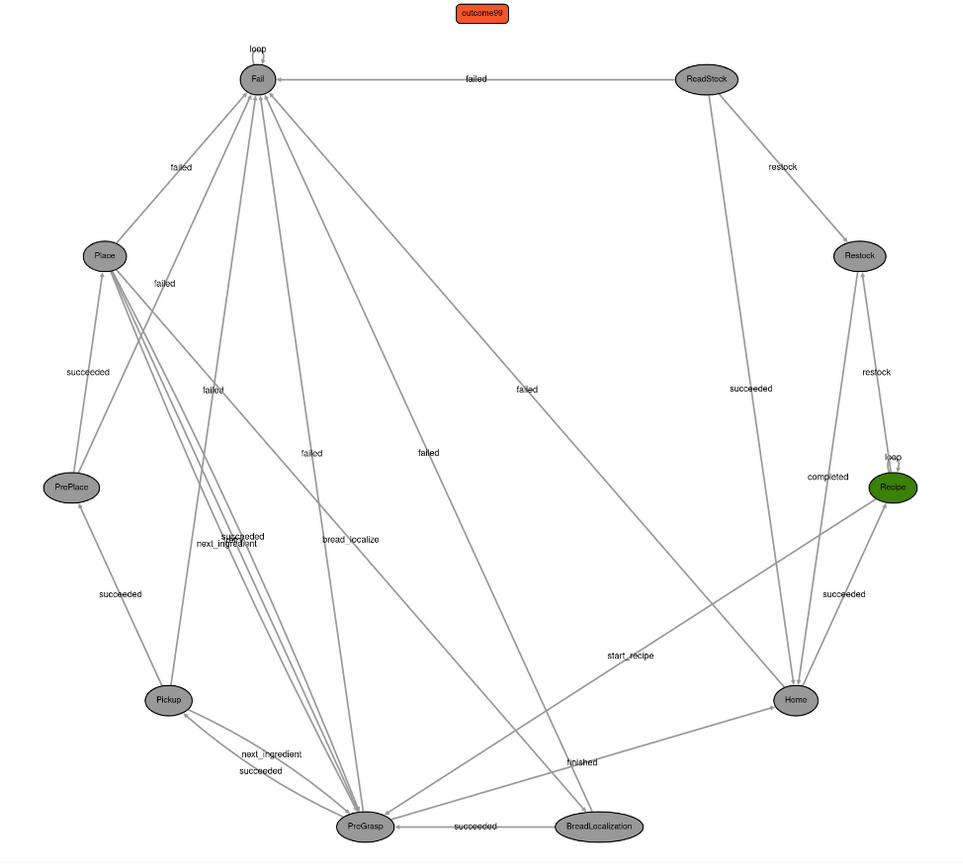
ReadStock → Home → Recipe → PreGrasp → Pickup → PrePlace → Place, with side paths forBreadLocalization,Restock, andFail. - Shared context: the blackboard holds
stockandrecipedictionaries loaded from YAML, the current ingredient, gripper setup, assembly coordinates, running weight/vision feedback, retry counters, and aSandwichLoggerfor traceability. - Action/service integration: states call manipulation actions (
ReturnHome,ExecuteTrajectory,Pickup,Place), vision services (GetXYZFromImage,CheckIngredientPlace), shredded grasp planning, and weight sensors.send_goalcentralizes action handling. - Flow of Code:
PreGraspchooses the next ingredient and moves to its bin;Pickupretries vision-guided grasps with weight verification;PrePlacemoves to the assembly tray;Placedrops the item, checks weight/vision tolerance, updates recipe progress, and triggersBreadLocalizationafter the bottom slice;FailandRestocksafely persist stock and pause the robot. - Visualization:
YasminViewerPub("yasmin_snaak", sm)publishes the state machine so operators can inspect progress live. The visualization of our system is shown below
Yasmin vs. Behavior Trees
- Pros: very small API; explicit transition tables make debugging straightforward; blackboard simplifies sharing perception/action results; viewer gives immediate observability; close to SMACH for teams migrating from ROS 1.
- Cons: less expressive than behavior trees for concurrent or fallback logic; transitions can grow unwieldy in large graphs compared to BT compositional nodes; no built-in tick-rate control or decorators like throttling; requires disciplined state design to avoid large monolithic
executeblocks. - When to choose Yasmin: linear or mildly branching task flows (pick–place sequences, setup/teardown) where clarity and low overhead are priorities. Use behavior trees when you need richer composition, better low level control, or parallel behavior.
Summary
Yasmin brings a clear, ROS 2–native state machine to structure task logic with minimal boilerplate. Define outcomes, wire transitions, and keep run-time data on the blackboard. In our sandwich-assembly robot it ties together perception, manipulation, and inventory tracking while remaining easy to visualize. Reach for behavior trees when you need more complex composition; otherwise Yasmin offers a simple, readable backbone for many manipulation workflows.
See Also:
Further Reading
- Yasmin documentation (4.0.1)
- Yasmin source and documentation (official repository)
- ROS 2 action design guide
- ROS 2 service design guide
- Behavior tree tutorials for ROS 2
References
- Include project-specific reports or papers here.