Advanced MoveIt usage for Manipulator Motion Planning
Motivation
Every robotics project with manipulator arms requires careful selection of motion planning components, and a good understanding of when to use what planning approach. This guide intends to show our process for implementing motion planning for dual XArm 7 manipulators in our project, VADER.
-
Firstly, depending on the current movement task at hand, some motion planning methods may be more beneficial than others. In this wiki, we primarily explore the RRTStar and the Cartesian movement planners.
-
We experimented with different planner settings for the RRTStar planning algorithm, and implemented a custom cost objective function to use in this planner. We also picked better starting joint space configurations to avoid singularities when using the Cartesian planner.
-
Finally, we describe our testing routines for the motion planner to ensure overall success and reason about common failure modes.
Planner Usage
The primary task of our dual-manipulator project is to harvest and store green peppers autonomously. We have a left arm with a cutter attachment, and a right arm with a gripper attachment. The overall harvesting sequence requires the following movements of the manipulators:
- Restore both arms to known ‘home’ poses,
- Move both arms to ~15cm away from a coarse pose estimation of the pepper to get a better pose estimate,
- Move gripper fully into grasp position,
- Move cutter fully into grasp position,
- After harvest, the cutter goes to home pose while the gripper moves the pepper to a storage bin.
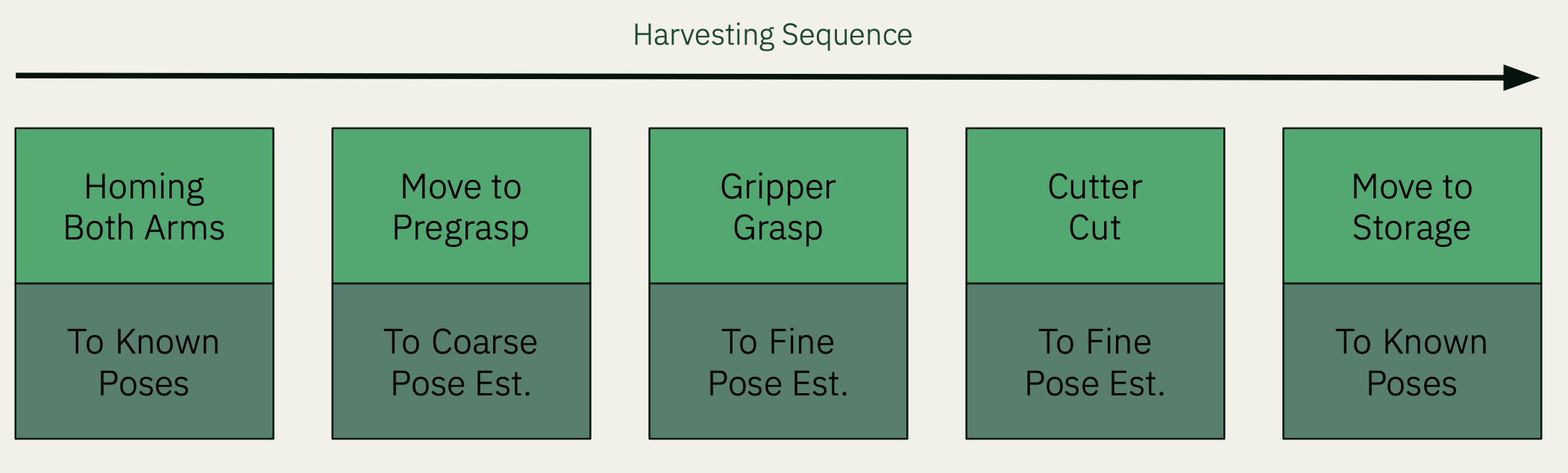
The home pose of both arms, as well as the gripper pose when storing the pepper, are fixed. The coarse and fine pose estimates of the target pepper depends on the placement of the system, and are therefore fairly variable.
RRTStar vs. Cartesian Planner
A mixture of these two planners are used during our harvesting process along different stages.
The RRTStar planner plans in joint space, and by default (we will talk about this further in the next section), the best solution is defined as minimizing the amount that each joint moves.
The Cartesian planner plans in a straight line from A to B, and computes the joint position at each waypoint given where the end effector should be. The translation and rotation are interpolated along the path.
| Type | RRTStar | Cartesian |
|---|---|---|
| Advantages | Consistently finds a viable solution, especially if using joint goals. Maneuvers freely in obstacle-rich environment to disentangle arms. | Very fast to compute & execute. Path deterministic and predictable. |
| Drawbacks | Solution not deterministic and can travel too far in free space. Requires careful placement of collision objects to discourage winding paths. Slower to compute & execute. | Solution could cause singularities and controller error if running into joint limits. This means the solution success is dependent on the starting joint configuration. |
| Usage | This is used in our Homing motions as well as the gripper move-to-storage motion. | This is used in our pregrasp, final grasp, retraction (after harvest), and lowering the pepper down to the final storage location. |
| Example Path | 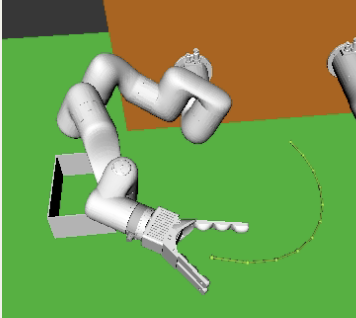 |
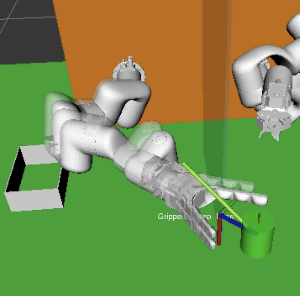 |
We will talk about each of these planners in greater detail below.
RRTStar settings and custom cost objectives
The ompl_planning.yaml file is where the planner settings are derived from - but that’s not all you can specify! The best reference for all the available planner parameters are available from their source code HERE, with plenty of default values that aren’t shown in the configuration file. Even if your use case doesn’t concern as many special settings as this covers, it is helpful to be aware of extra settings not present in the files by default.
Creating a custom optimization objective for MoveIt
We wanted to implement our own cost objective function instead of the default minimize-path-length option. To define a custom objective for RRT (or for any planner), extend the OptimizationObjective class with your logic, where the motion cost between two states (joint configurations) is set.
Refer to our code being discussed in this section over HERE.
To create a task-space cost function, we fetched the Denavit-Hartenburg parameters from the official UFactory website, and implemented a simple forward kinematics class that transforms the joint positions into the end effector pose. Then, the XarmTaskSpaceOptimizationObjective class is defined with the motion cost between states equal to the L2 distance between the poses (currently not counting the rotation).
Finally, the VADERCustomObjective class is an instance of the MultiOptimizationObjective class from OMPL, which uses a weighted combination of different optimization classes. We can now use this objective in place of the default PathLengthOptimizationObjective (or, better yet, add the path length objective as one of the weighted sum classes in your custom objective).
Using a custom objective
After building this objective, using it in your planner through MoveIt requires some changes to MoveIt’s source code. This is because it takes an if-else list of acceptable objectives, and you have to add your own option directed at your custom class. Fork your copy of MoveIt, and modify model_based_planning_context.cpp and refer to HERE for our changes.
Finally after all that, change your configuration under ompl_planning.yaml like so, matching the string to what you specified above:
# ompl_planning.yaml
...
  VADER:
    type: geometric::RRTstar
    ...
    optimization_objective: VADERCustomObjective
xarm7:
  default_planner_config: VADER
  planner_configs:
    - VADER
The efficacy of the multi optimization objective depends on your weighted sum of objectives, among other factors, but now you have full control over your desired behavior of the RRT planner!
Planning in Cartesian space
Besides RRT, Cartesian space planning can also be done in native MoveIt with move_group.computeCartesianPath(). You can specify just a goal pose, or an entire preset vector of waypoints, and it outputs a trajectory and the resulting ‘fraction’ of the path covered by the plan - in general, any fraction lower than 1.0 indicates planning failure, since it wasn’t able to account for the full motion.
A few things to be aware when using the Cartesian planner are:
-
Beware of joint limits in your configuration. One major failure mode of the Cartesian planner is starting in a joint configuration with inevitable singularities due to joints reaching their lower or upper joint limits, at which point the planner will fail. If you can start with a known good joint configuration, where none of the joints are approaching their limits and it’s unlikely the goal state involves self collision or singularities, it would result in much higher success rates.
-
If you are using intermediate waypoints, use
tf::Quaternion::slerp()to interpolate between rotations by a ratio.
Testing, testing, testing
To help in testing the robustness and failure modes of our planning and state machine subsystems, we created a Simulation Director system to test the entire system (minus Perception parts) in an RViz/Gazebo simulation.
For each simulated run, a randomized pepper ground truth pose is generated, and noise added. We run the entire system given this pose estimate, and watch how the RRT and Cartesian planners fail in which circumstances (due to reachability, planner failure, etc.). An example result of 100 aggregated runs is shown below, and higher failure rates at either ends of the horizontal workspace are observed.
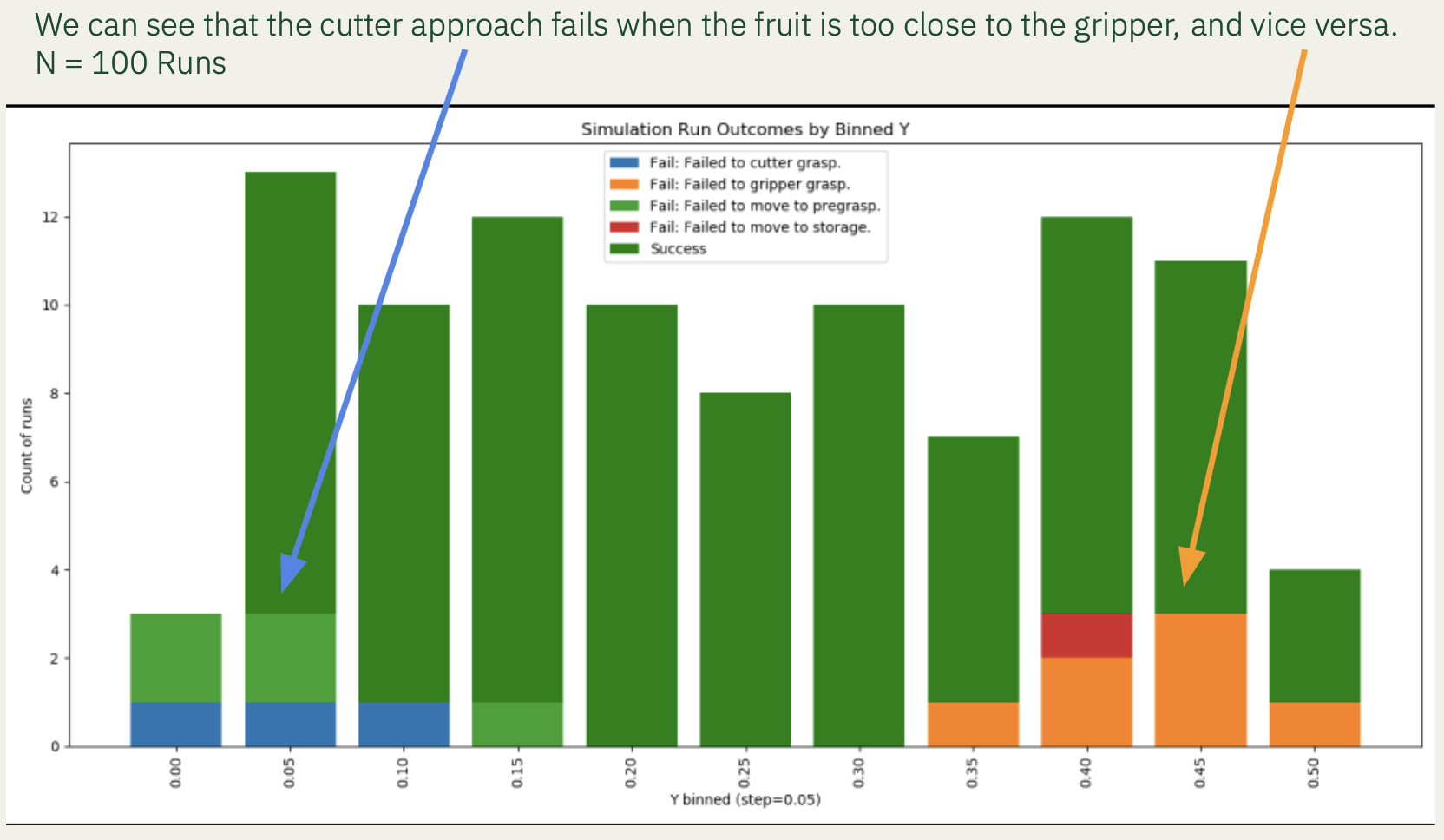
This helped us quantify exactly how the overall system may fail due to lack of reachability for either arms, and how to position our platform in front of peppers during the Fall Validation Demo.
Conclusion
With the use of a combination of the two planners, as well as repeated testing, we were able to create a robust planning subsystem for our dual-armed system. We hope our findings are useful for future teams using MoveIt for articulated arms!